Skip to content
Table

Restaurant POS · Lebanon Run the floor, not the other way around.

Waiters, kitchen and cashier on one system, built around how a Lebanese restaurant runs a service: table by table, in two currencies, with the kitchen one step ahead.

Made in Lebanon USD + LBP on every sale 14-day free trial, no card

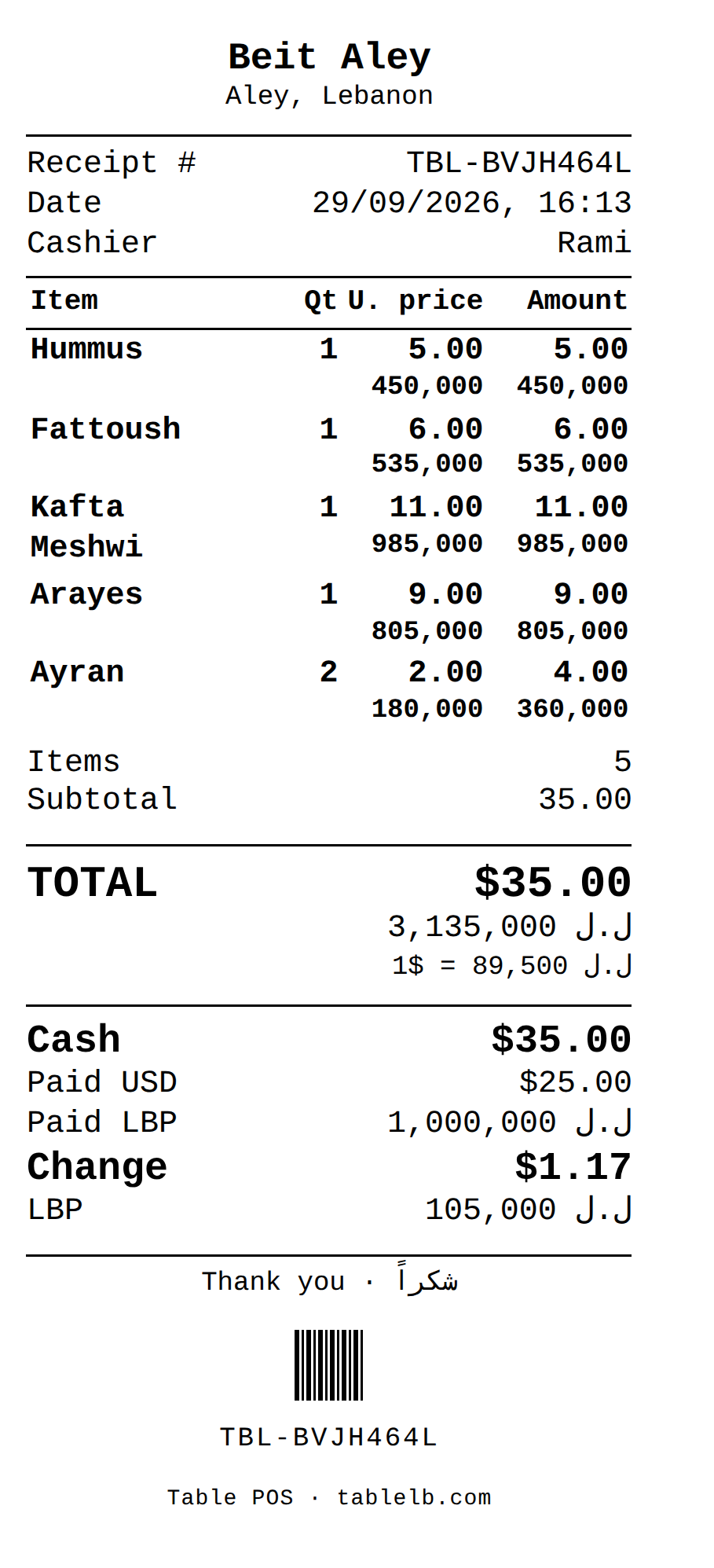
Photo: Unsplash. Screen: an 80 mm receipt from the till, shown with the fictional Beit Aley demo shop.

The problem

Where a busy service goes wrong.

The bill doesn’t match the table

A shared mezze order, a late round of drinks, a party that moves to another table — the bill has to follow the table, and paper can’t keep up.

The kitchen finds out last

A waiter’s handwritten order gets lost, misread, or delayed on a busy Friday night. By the time food comes out wrong, the table’s already annoyed.

Food cost is a guess

With the exchange rate moving and ingredient prices changing, most restaurants only find out they’re losing money on a dish months later — if they ever do.

The real screens

See it on the till.

Unedited captures of Table, taken in a fictional demo shop. Open one to see it full size.

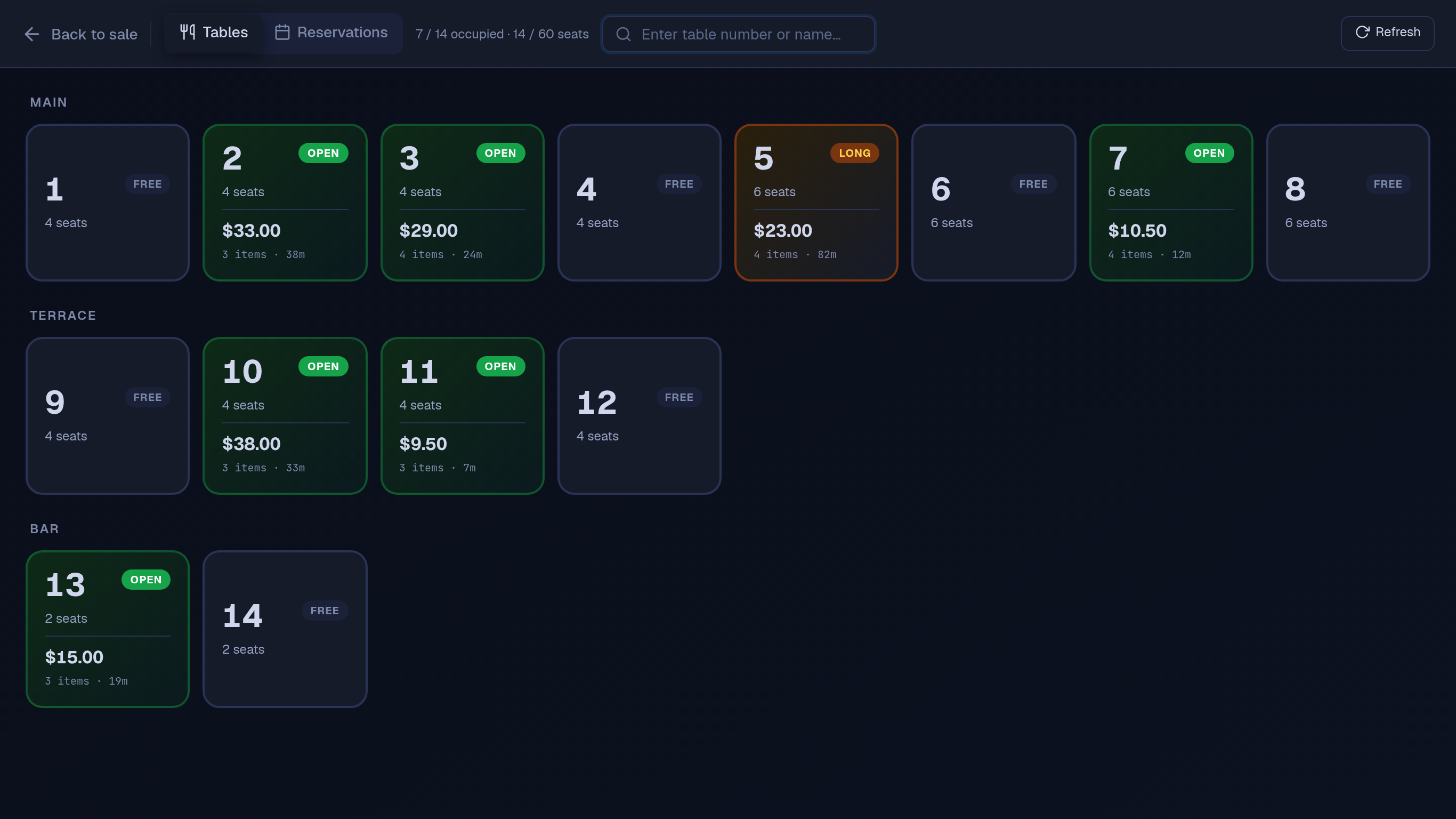
Table POS floor view: 14 tables grouped into Main, Terrace and Bar, 7 of them open with their tab totals, item counts and minutes open, one marked Long after 82 minutes
(opens the full-size screenshot)
Table POS floor view: 14 tables grouped into Main, Terrace and Bar, 7 of them open with their tab totals, item counts and minutes open, one marked Long after 82 minutes
The till's floor view: each open table's total, items and time open, grouped by area. Shown with the fictional Beit Aley demo shop.
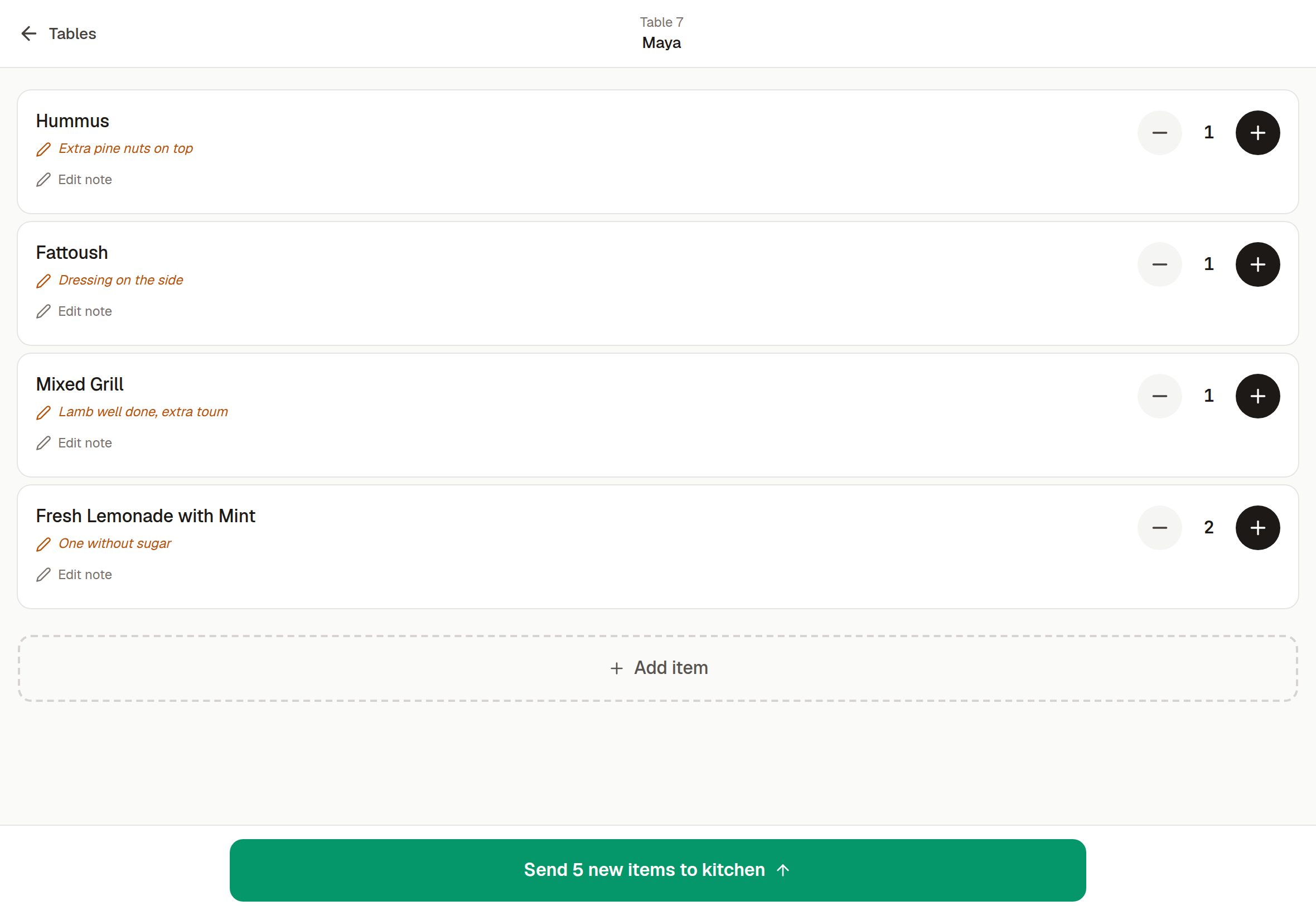
Table waiter tablet: waiter Maya's order for table 7 — Hummus, Fattoush, Mixed Grill and two Fresh Lemonades with Mint — each line with a kitchen note, and a 'Send 5 new items to kitchen' button
(opens the full-size screenshot)
Table waiter tablet: waiter Maya's order for table 7 — Hummus, Fattoush, Mixed Grill and two Fresh Lemonades with Mint — each line with a kitchen note, and a 'Send 5 new items to kitchen' button
Waiter tablet: a note per dish, sent to the kitchen printer through the till. No prices on the tablet. Shown with the fictional Beit Aley demo shop.

Built for this

What the restaurant POS does on the floor.

01

Waiter tablets, table by table

Each waiter takes orders at the table on a tablet, signing in with the restaurant PIN and tapping their own name. Orders go from the tablet to the kitchen printer through the till, so nobody carries a paper slip back. The till has to be open and signed in, with the printer connected.

02

Kitchen tickets by station

Route drinks to the bar, mains to the kitchen, dessert to pastry — set once by category, so nothing gets missed on a packed night.

03

Recipes that know their real cost

Every dish is built from ingredients with their current cost, and every sale deducts them, so you see the margin you’re making, not a guess from six months ago.

04

Cash management + Z-reports

Open a shift, record pay-ins and pay-outs, and close with the counted dollars and lira against what the till expected, per currency.

05

Works when the internet doesn’t

Lose wifi mid-service and the till keeps going: sales, tables and parked rounds work on its own copy, and receipts and kitchen tickets still print. Waiter tablets keep the orders they take and send them when the connection returns; until then those orders don’t print, so call them through.

USD + LBP

Dollars and lira on one bill.

One table’s bill can be paid in several parts, in dollars, lira or both, and the receipt lists each part.

Every sale stores the rate it used and is kept in dollars, so past dollar totals don’t move with the lira. Lira shown to the customer is rounded to the 5,000 note.

A $ bill. They hand you $ and ل.ل.

For example, give $3 — the till fills in 10,000 ل.ل

or 280,000 ل.ل all in lira

The cashier picks how many dollars to give back; the till works out the lira.

Lira price 5,100,000 ل.ل

Example rate: 89,500 ل.ل per $1. Your till uses the day's rate from lirarate.org or one you set. How dual currency works

Questions

What restaurant owners ask.

Can waiters take orders without seeing prices?

Yes. The waiter tablet shows the menu and the tables, not prices or payment buttons. Each waiter signs in with the restaurant PIN and taps their own name, and the name of the waiter who opened the table prints on its kitchen tickets. It’s $5 a month or $50 a year per tablet.

Can one table’s bill be split between guests?

Not into separate bills. One bill can be paid in several parts: cash, card, Whish or on account, in dollars or lira, and the receipt lists each part. Splitting by guest, seat or item into separate receipts isn’t supported. You can move a table’s order to another table.

Do kitchen and bar get separate tickets?

Yes. Route drinks to the bar, mains to the kitchen, dessert to pastry — configured once, per category. Nothing gets missed because one printer had the whole order.

Will I know what a dish actually costs me?

Yes, if you build it as a recipe. Each dish draws from ingredients with their current costs, so the margin shown is calculated from what you paid, not from a figure you set months ago.

What it costs

POS licence $10 / month or $100 / year

One Windows till with every feature not marked as an add-on on /features, the owner phone app, and support on WhatsApp.

Full pricing
  • Waiter tablet · $5 / month or $50 / year eachAn add-on, switched on for you by Table.

Your restaurant, fully wired.

Sign up yourself, or message us on WhatsApp and we’ll set it up with you.

14 days free · no credit card

What happens next

  1. 01

    Sign up

    Your shop’s name and your mobile number. The shop and its PIN are created on the spot.

  2. 02

    Download the Windows app

    The till runs in the Table app for Windows. Download it

  3. 03

    Connect the app

    Click Download on the signup screen and the app picks up the 6-character pairing code shown when you sign up (valid 24 hours) when it opens on the same computer; anywhere else, enter the code. After 24 hours, message Table on WhatsApp for a new one.

Help installing? WhatsApp +961 81 664 397tableposlb@gmail.com