Skip to content
Table

Multi-branch POS · Lebanon Growing past one counter.

With a second till or a second location, the hard part is knowing. Table gives every till its own drawer and Z-report, keeps stock by location, and runs each branch as its own shop.

Made in Lebanon USD + LBP on every sale 14-day free trial, no card

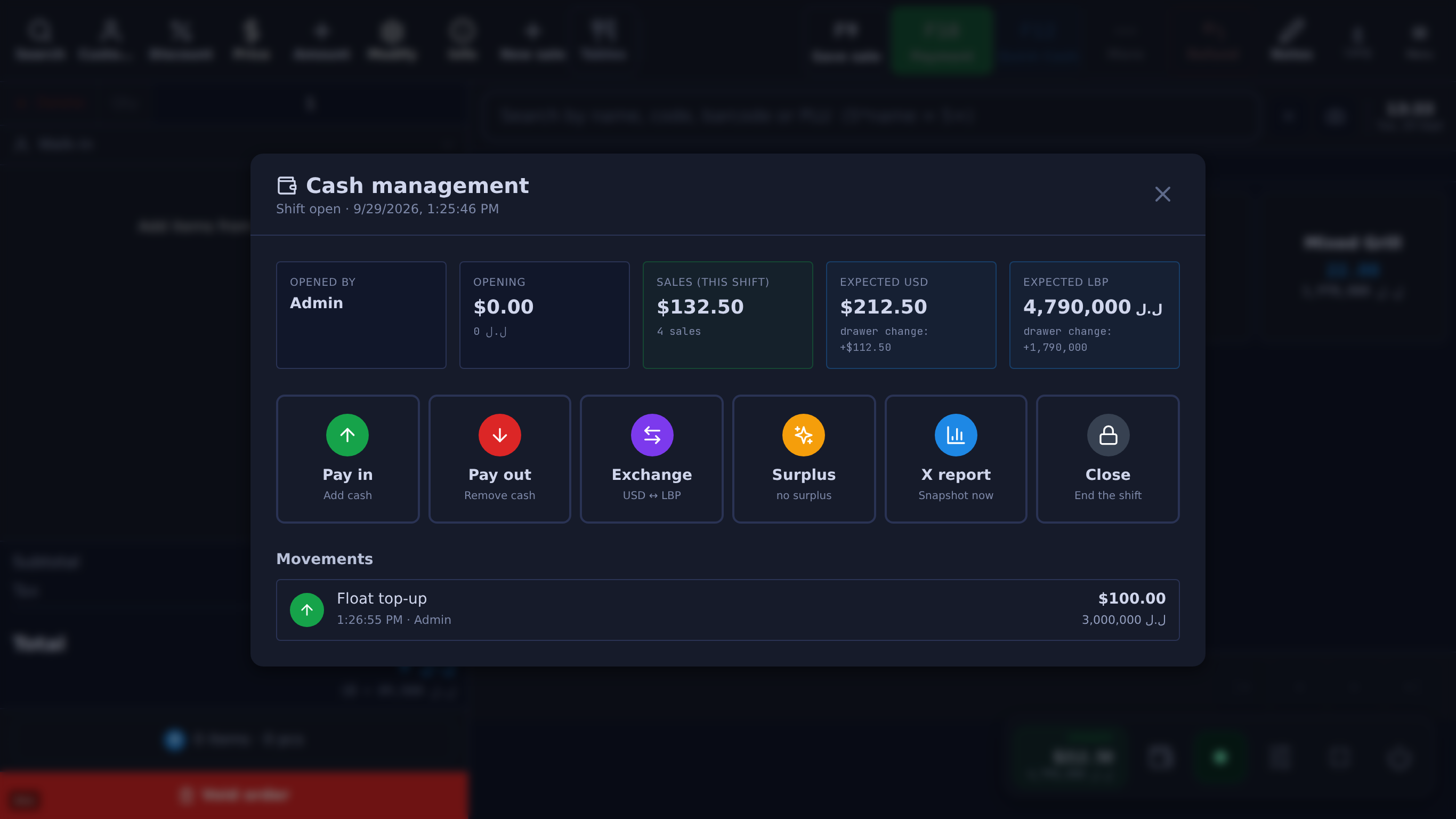
Cash management for an open shift: $132.50 in sales, expected drawer of $212.50 and 4,790,000 LBP, with Pay in, Pay out, Exchange, Surplus, X report and Close
(opens the full-size screenshot)
Cash management for an open shift: $132.50 in sales, expected drawer of $212.50 and 4,790,000 LBP, with Pay in, Pay out, Exchange, Surplus, X report and Close
Cash management: expected cash per currency, pay-ins, pay-outs, exchange and the X report. Shown with the fictional Beit Aley demo shop.

The problem

What breaks when you add the second one.

One drawer, too many hands

When two tills share one cash count, a shortfall belongs to nobody. You can’t tell which counter it came from, so you can’t fix it.

You can’t be in both

Whatever happens at the counter you’re not standing at is a phone call away. Discounts, voids, a drawer that doesn’t balance — you hear about it the next day, if at all.

Stock in the wrong place

The storeroom has forty, the shelf has none. If stock is one number for the whole business, you can’t tell what’s on the floor and what’s still in the back.

What you get

Built for more than one till.

01

Each branch is its own shop

A second branch runs as its own Table shop, with its own till, stock, staff, prices and reports, so one location can run differently from the other. There is no combined view across branches: each shop’s numbers are in its own reports and its own owner app.

02

Each till balances on its own

Every register keeps its own cash box, its own shift and its own end-of-day Z-report, and they never share a balance. A shortfall belongs to one till, not to the whole shop.

03

Several registers per shop

A shop isn’t limited to one till. Add registers where the queue needs them, at $10 a month each, and each device picks its register in Settings. Tills in the same shop share its prices, staff and payment methods.

04

Stock split across locations

Keep separate counts for the shop floor, a warehouse or a kitchen, move stock between them with a transfer, and set which location each till sells from.

05

Who did what, at every till

Per-user access levels and the activity log, so a void or a discount has a name attached, whichever till it happened on.

06

Reports by till, or all together

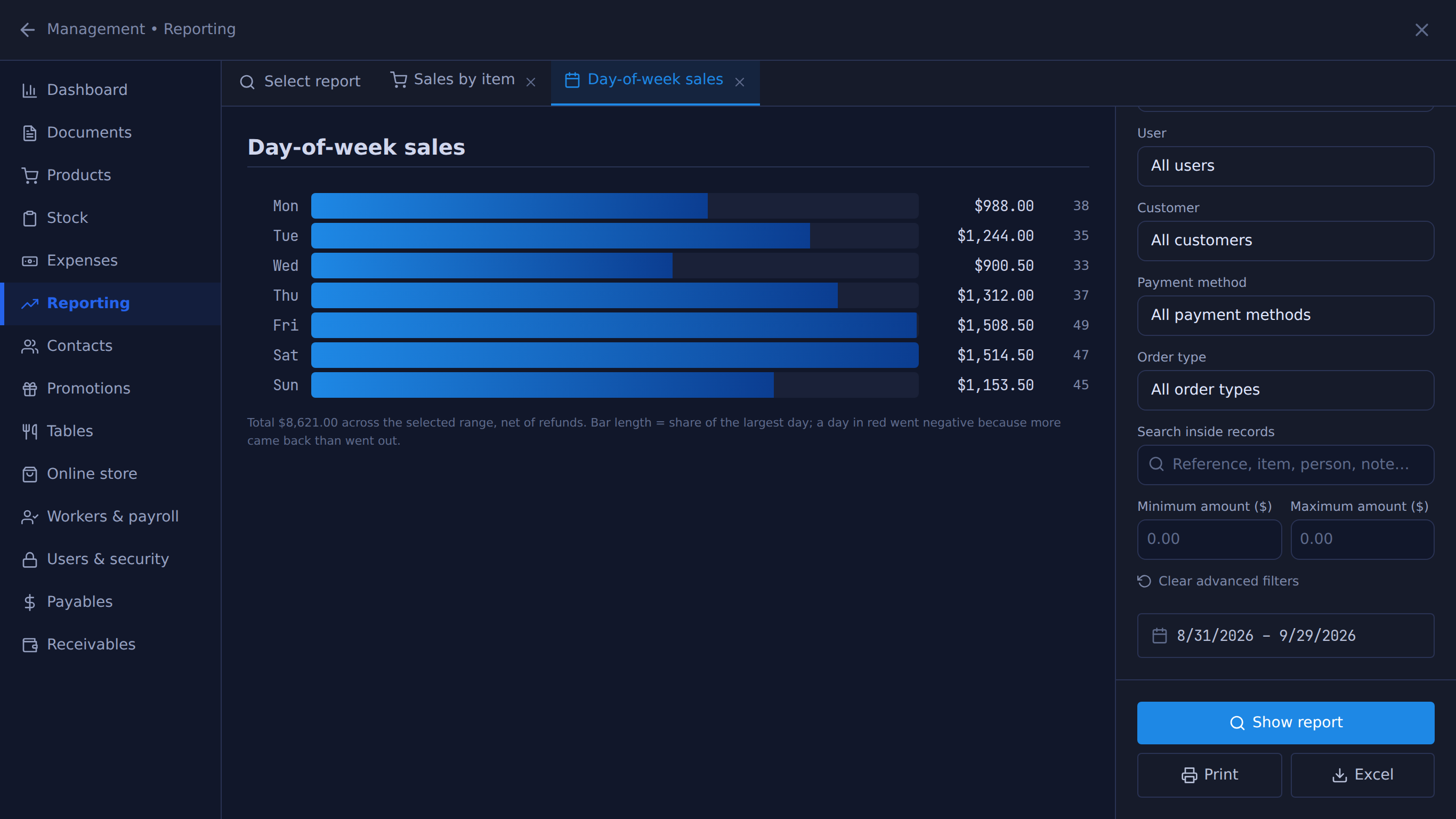
57 reports out of the box — sales, profit, staff, cash, stock — for all the shop’s tills or one at a time, each saved in one click as a CSV file that opens in Excel when your accountant wants it.

07

On your phone, from anywhere

The owner phone app is included with every licence at no extra cost, so checking on a shop you’re not at doesn’t mean driving there.

08

Priced per shop

Multi-branch is quoted per location rather than sold as a fixed tier — how it’s set up depends on how many shops and tills there are. Tell us the shape and we’ll price it.

The real screens

One shop’s numbers, per till or together.

Unedited captures of Table, taken in a fictional demo shop. Open one to see it full size.

Day-of-week sales for the last 30 days as horizontal bars, Saturday highest
(opens the full-size screenshot)
Day-of-week sales for the last 30 days as horizontal bars, Saturday highest
One shop’s report — each branch has its own. Shown with the fictional Beit Aley demo shop.

What it costs

POS licence $10 / month or $100 / year

One Windows till with every feature not marked as an add-on on /features, the owner phone app, and support on WhatsApp.

Full pricing
  • Extra POS terminal · $10 / month or $100 / year eachAn add-on, switched on for you by Table.
  • Multi-branch · quoted per shopMessage us with how many shops and tills you run.

Every till, its own set of numbers.

Try it on one shop first, and talk to us when you’re ready to add the second.

14 days free · no credit card

What happens next

  1. 01

    Sign up

    Your shop’s name and your mobile number. The shop and its PIN are created on the spot.

  2. 02

    Download the Windows app

    The till runs in the Table app for Windows. Download it

  3. 03

    Connect the app

    Click Download on the signup screen and the app picks up the 6-character pairing code shown when you sign up (valid 24 hours) when it opens on the same computer; anywhere else, enter the code. After 24 hours, message Table on WhatsApp for a new one.

Help installing? WhatsApp +961 81 664 397tableposlb@gmail.com